Ultimate Guide for Warehouse Management System for Small Business
Table Of Content
Published Date :
28 Nov 2025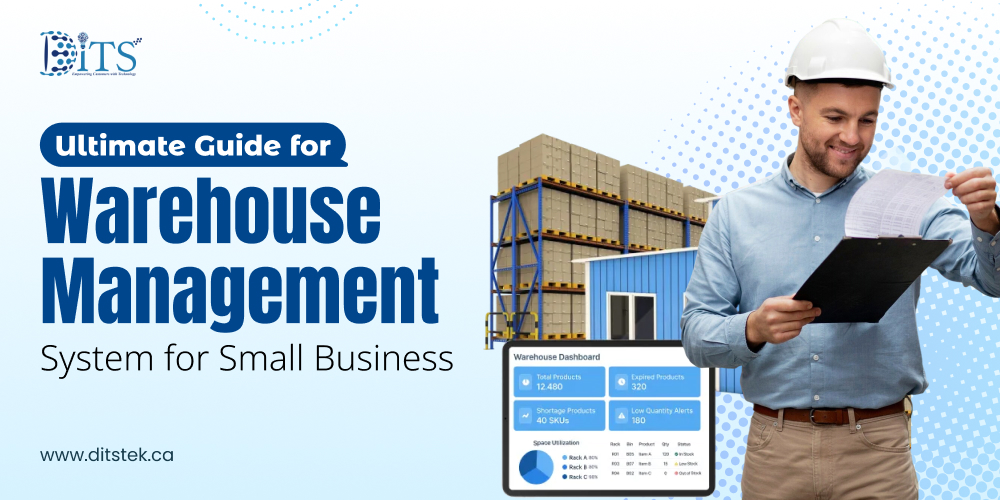
Running a small warehouse looks simple from the outside. A few racks, a couple of staff members, and boxes moving in and out. But anyone who has managed one knows the chaos that slips in when orders rise or when stock doesn’t match what the spreadsheet shows. That’s usually the moment business owners start exploring a warehouse management system for small business, not because it’s trendy, but because manual control eventually hits a wall.
Most small companies in Canada don’t struggle due to a lack of effort. It’s usually the little things piling up, delayed picking because items aren’t where they should be, returns increasing because the wrong product went out, or maybe an entire day lost to stock counting. And when this becomes routine, growth slows down without warning.
A good warehouse tool changes that rhythm. It helps with faster order preparation, real-time visibility of what’s available, and a system that quietly keeps everything on track. Even a small warehouse feels more organized when data flows correctly. It supports precise stock management and fulfills orders on time.
This guide walks through everything a small business should know, the features that matter, the cost you should expect, and how Canadian companies can adopt these systems without disrupting daily work.
Ready to eliminate warehouse errors and delays? Let’s build a WMS that fits your exact workflow.
What Is Warehouse Management System for Small Business?
A warehouse is actually a moving space where orders, suppliers, returns, and restocks constantly overlap. That’s why many small companies eventually switch from basic spreadsheets to something more reliable. A warehouse management system steps in as that reliable layer.
A WMS helps teams to find out which shelf holds what, and the system gives them the exact location instantly. It tracks precisely what came in, what went out, and what’s about to run low.
For a small operation, a warehouse inventory management system doesn’t need to be complicated. In fact, the simpler it feels, the better the adoption. Most tools focus on a few essentials, including item locations, quantities, movement history, and order handling. These basics alone remove so many daily hurdles that make WMS a must-have tool for businesses in Canada.
So when we talk about a warehouse management system for small business, it isn’t about buying heavy tech, but creating a work environment where things don’t fall through the cracks every other day. That alone brings a sense of relief to any growing business.
Why Small Businesses Need WMS
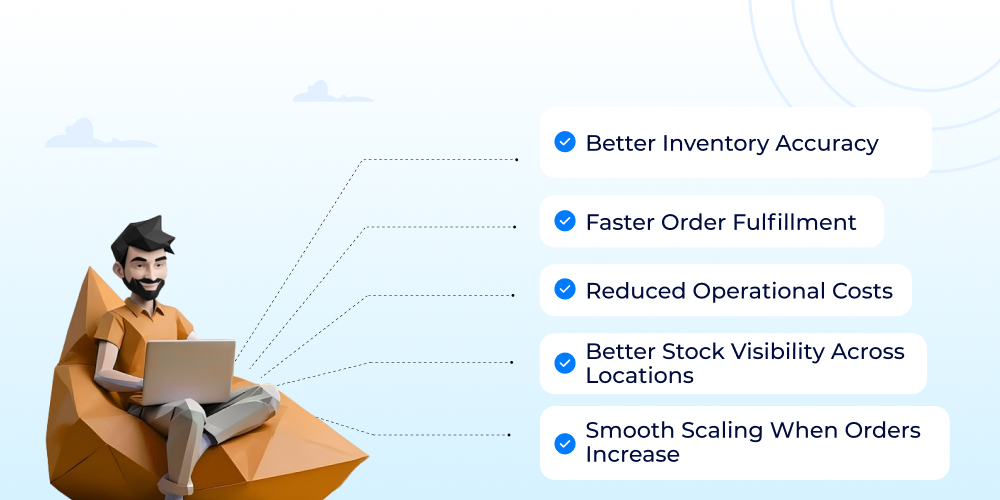
Small warehouses usually run on tight schedules and even tighter margins. One delayed order or one wrong shipment can ripple through the entire day. That’s why a proper WMS becomes more than a “nice-to-have” tool. It becomes the system that keeps things from collapsing during busy weeks. Let's explore the key benefits of using a warehouse management system for small businesses.
Better Inventory Accuracy
Sometimes a team opens a box expecting 20 units and found 13, which leads to inaccuracies in the stock. A WMS updates stock the moment something moves. It eliminates the possibility of mismatch between what’s on the shelf and what’s on the screen. It brings a level of accuracy that spreadsheets rarely manage.
Faster Order Fulfillment
Small businesses often compete with companies that ship in hours, not days. With a WMS guiding staff directly to the item location, picking becomes quick and clean. Less wandering, fewer errors, and a workflow that finally matches the pace customers expect.
Reduced Operational Costs
Nobody likes costly surprises, especially when they eat into a tight budget. Over-ordering, stockouts, lost items, they all drain money quietly. A good WMS reduces that waste. You buy what’s needed, keep what sells, and avoid piling up items that sit idle for months.
Better Stock Visibility Across Locations
Some small businesses store products in multiple rooms, rented units, or small satellite spaces. Without a clear view of each spot, confusion creeps in fast. A WMS brings everything into one screen, so teams don’t shuffle between locations trying to “confirm” where something is.
Smooth Scaling When Orders Increase
Here’s the kicker: as order volume grows, the old ways of working fall apart quickly. A WMS helps the business scale without adding a big team. Processes stay manageable, even when workloads spike during festivals, promotions, or seasonal peaks.
A small warehouse becomes far more predictable with a structured system in place. And predictability, that’s what keeps customers happy and operations stable.
Your warehouse deserves more than spreadsheets. Get a smart, AI-powered WMS built for small business growth.
Types Of WMS For Small Business
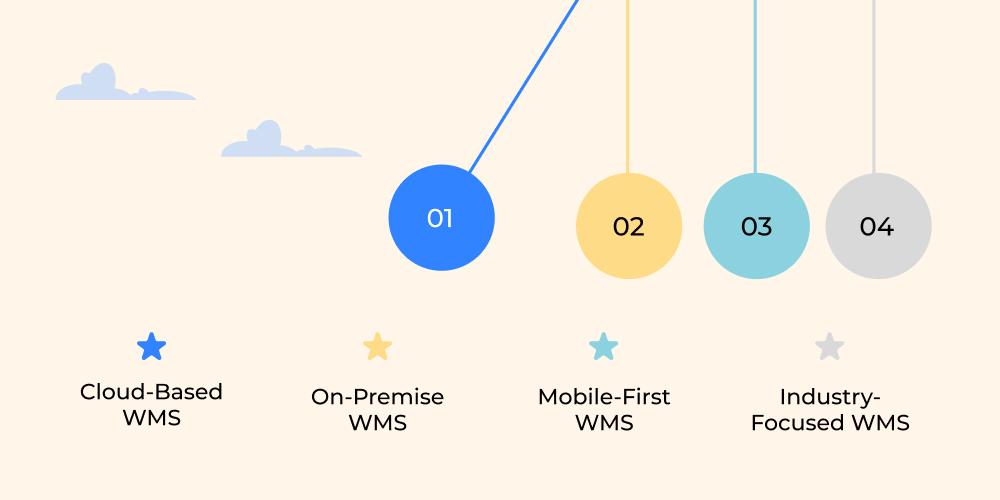
Small businesses don’t all operate the same way, so a single type of WMS rarely fits everyone. Some need something lightweight to manage daily stock movement, while others look for tools that sync with sales channels or multiple storage points. The good thing is there’s a version for almost every setup.
Cloud-Based WMS
Many small companies lean toward a cloud based warehouse management system because it doesn’t demand servers or heavy IT work. Everything runs online. Updates happen automatically, and teams can access data from phones or tablets. It’s flexible, especially for businesses that don’t want to maintain hardware or deal with complicated installations.
On-Premise WMS
Some established warehouses prefer systems installed within their physical space. These are more controlled, more customizable, and sometimes better suited when sensitive data or complex workflows are involved. They usually need IT support, though, which is why smaller teams consider them only when absolutely necessary.
Mobile-First WMS
This type works well for warehouses where staff constantly move around. Scanning barcodes directly from a phone or handheld device speeds up stock updates. It’s simple, practical, and doesn’t interrupt the rhythm of daily operations.
Industry-Focused WMS
Retail, distribution, FMCG, and even small manufacturing units benefit from industry-specific configurations. These systems come with built-in templates for order handling, product categorization, and stock flow. It saves time because the business doesn’t need to “teach” the system how things work.
Choosing the right type depends on your warehouse size, team strength, and how fast your inventory moves. What matters is picking something that doesn’t overwhelm the staff but still keeps operations structured.
Must-Have Features In WMS For Small Business
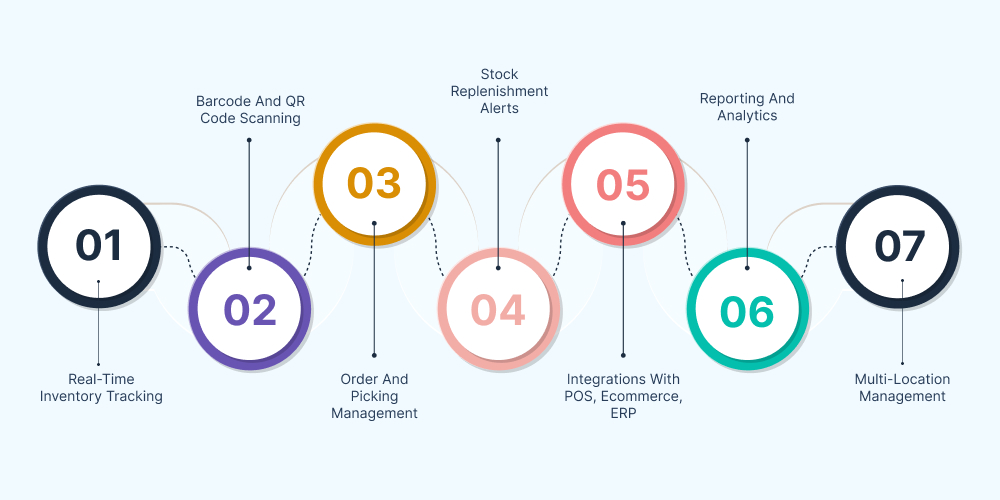
Small businesses don’t always need a large, complex system. What they truly need is a tool that handles everyday challenges without slowing teams down. The right features create smoother workflows, fewer errors, and a warehouse that finally feels in control.
Real-Time Inventory Tracking
Nothing slows a business more than outdated stock numbers. Real-time updates show what’s available, what’s reserved, and what’s running low. Teams don’t waste time hunting for missing items because the system already tells them where everything sits.
At DITS, we work with modern technologies such as IoT development services when warehouses need automated tracking or connected hardware.
Barcode And QR Code Scanning
A quick scan replaces long manual entries. It reduces errors and keeps stock movement precise. Staff simply scan an item when it enters or leaves the warehouse, and the update happens instantly. This simple step is enough to create a huge impact.
Order And Picking Management
When orders pile up, picking mistakes tend to follow. A good system guides staff through the most efficient picking route. It points them to the right shelf, bin, or rack. Even new employees adapt quickly because the WMS does most of the direction work.
Stock Replenishment Alerts
Running out of a fast-moving product can easily cost a sale. Alerts notify the warehouse team when quantities drop below a set limit. A WMS helps prevent last-minute rushes. Replenishing stock becomes a steady routine instead of a panic-driven task.
Integrations With POS, Ecommerce, ERP
When sales channels and inventory systems don’t talk to each other, mismatches appear everywhere. Integrations keep everything synchronized: orders, stock levels, returns, and product updates. That means fewer corrections and smoother operations throughout the day.
Reporting And Analytics
Sometimes the biggest challenges go unnoticed. Reporting tools highlight slow-moving items, peak order times, or frequent stock mistakes. These small insights help business owners adjust strategies and improve efficiency without guessing.
Multi-Location Management
For businesses storing products in more than one facility, or even extra rooms, visibility matters. A WMS puts all locations on one dashboard, so teams never mix up stock or send items from the wrong place.
And because many companies expand into broader supply-chain spaces, our experience in supply chain management software development ensures smooth cross-system communication for businesses who want everything updated all the time.
The features above create the foundation for a predictable, well-organized warehouse. And once these essentials fall into place, scaling becomes far easier.
Cost of Warehouse Management System For Small Business
Budget is usually the first concern for any small company thinking about switching to a digital system. Some tools look extremely affordable, while others seem built for enterprises. Organizations need to understand what they are actually paying for.
Most cloud-based options start with monthly or yearly subscriptions. Smaller teams typically spend anywhere between $80 to $400 per month, depending on users, features, and integrations. It’s predictable, which helps with planning, and there’s no need for servers or a dedicated IT setup. A lot of small operators like that comfort.
On the other hand, if a business leans toward an on-site system, the upfront investment is higher. Implementation, licenses, hardware, and training can push the initial cost to a few thousand dollars. But once installed, ongoing expenses stay relatively controlled. It suits teams that prefer long-term ownership of a warehouse management system.
Then there are a few hidden costs. Barcode scanners, label printers, extra user accounts, or integration work with ecommerce platforms, each of these adds a small layer to the budget. Nothing dramatic, but worth planning for. Nobody enjoys unexpected invoices at the end of the month.
At DITS, our approach is slightly different. We rely on AI during development and quality assurance to reduce the time spent on customization. It helps keep the final cost lower while ensuring the software performs consistently well. That’s one reason many small companies feel more comfortable exploring tailored options.
A warehouse system doesn’t have to drain resources. With clarity on the requirements and a realistic view of growth, it becomes a wise investment rather than a cost-heavy upgrade.
Want a system that scales with your business instead of slowing it down? Connect with DITS for a custom WMS consultation.
Why Choose DITS For WMS Development
Small businesses often need systems that fit their workflows rather than forcing them to adapt to complex software. That’s where DITS stands out. Our team builds warehouse solutions that are simple, practical, and aligned with real operational needs.
We use AI during development and testing to maintain code quality and accelerate customization, ensuring a stable, budget-friendly final product. Whether it’s integration with existing tools, optimizing processes through Workflow Automation, or adding features tailored to your team, everything is created with scalability in mind.
Support continues long after deployment: updates, maintenance, and guidance are included to keep operations running smoothly for years.
Conclusion
A well-designed WMS does more than organize shelves. It brings order to everyday work, reduces delays, and gives small businesses the clarity they need to grow without chaos. When inventory moves smoothly, and teams work with accurate data, the entire warehouse becomes predictable, and predictable operations create room for expansion.
Whether a business wants to scale, streamline, or simply reduce errors, choosing the right system makes the difference. With flexible cloud tools, customizable platforms, and modernization options that work like Legacy Application Modernization, small companies have more control than ever.
The goal is simple: build a warehouse environment that supports growth rather than slowing it down.
FAQs
1. What is the best warehouse management system for small businesses?
The best system is one that fits your daily workflow without overwhelming your team. Many small companies choose cloud tools for easy setup, while others prefer custom-built solutions that match their exact operations.
2. Can a small business afford a WMS?
Yes. Most modern systems offer flexible pricing. Cloud subscriptions start low, and custom options can be tailored to match budget and scale.
3. How long does it take to implement a WMS?
Implementation usually takes a few days to a few weeks, depending on data migration, training, and warehouse size.
4. Does a WMS integrate with ecommerce stores or POS systems?
Most systems support integrations, keeping orders, returns, and stock updates fully synchronized.
5. What’s the difference between inventory software and a full WMS?
Inventory tools track quantities. A WMS manages the entire flow receiving, picking, packing, stock movement, and reporting.
6. Is a mobile-friendly WMS enough for a small warehouse?
For many small teams, yes. Mobile scanning and real-time updates often cover everyday needs.
7. Can DITS build a custom WMS for unique warehouse workflows?
Yes. DITS creates tailored systems, integrates AI for accuracy and performance, and supports additional technologies like IoT development services when needed.

Dinesh Thakur
21+ years of IT software development experience in different domains like Business Automation, Healthcare, Retail, Workflow automation, Transportation and logistics, Compliance, Risk Mitigation, POS, etc. Hands-on experience in dealing with overseas clients and providing them with an apt solution to their business needs.
Recent Posts
Explore how prior authorization software uses AI to automate workflows, reduce administrative effort, improve request accuracy, streamline approvals, and minimize treatment delays for healthcare organizations.

Discover how AI to improve patient experience in hospitals streamlines scheduling, communication, triage, queue management, and personalized care while enhancing operational efficiency.

Learn how IoT powers smart factories with connected devices, automation, predictive maintenance, and analytics.